Plan your day with clarity. See where every minute goes.

Tasks, timeline, focus timers, and real insights - in one calm app.
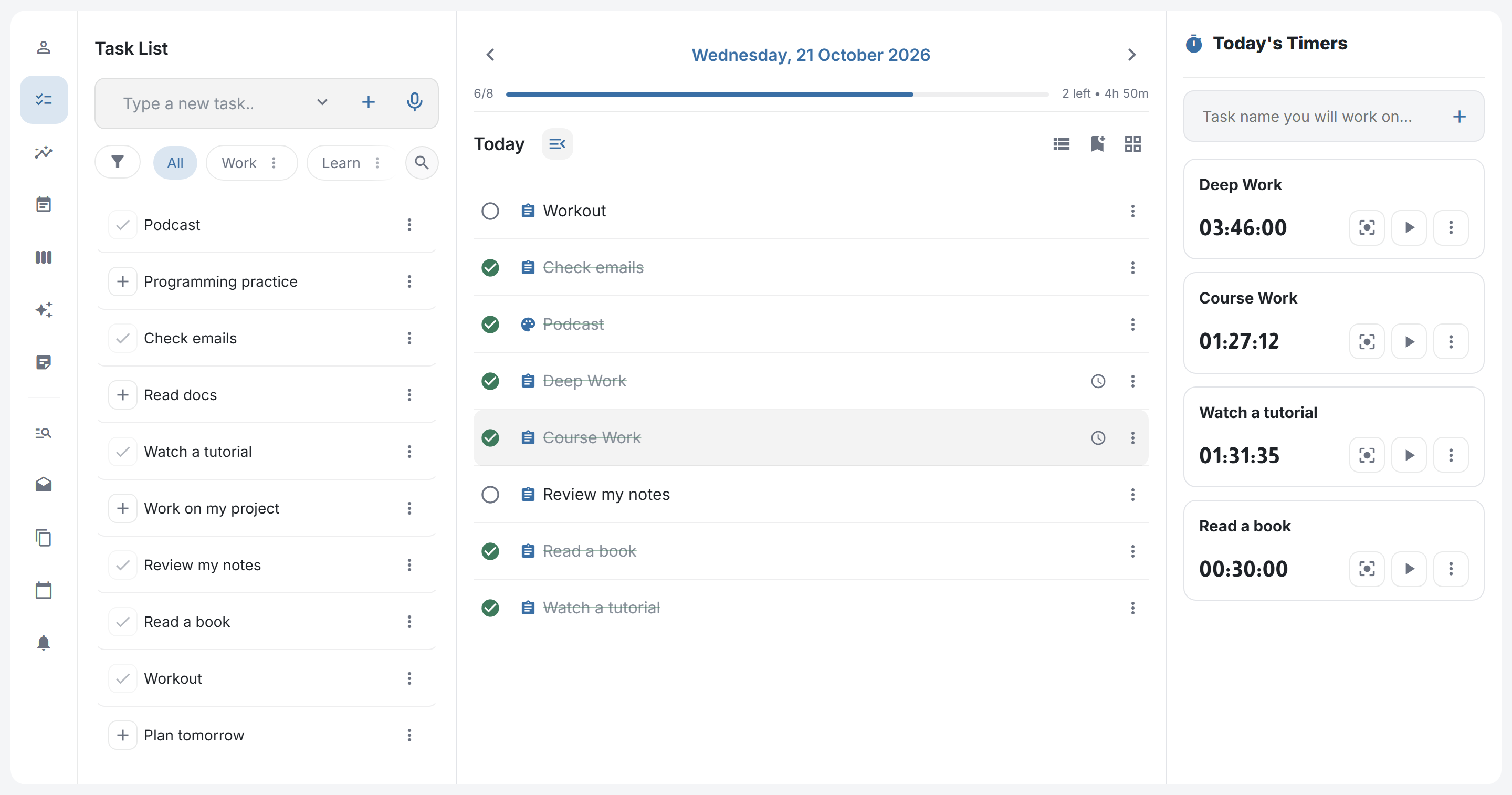
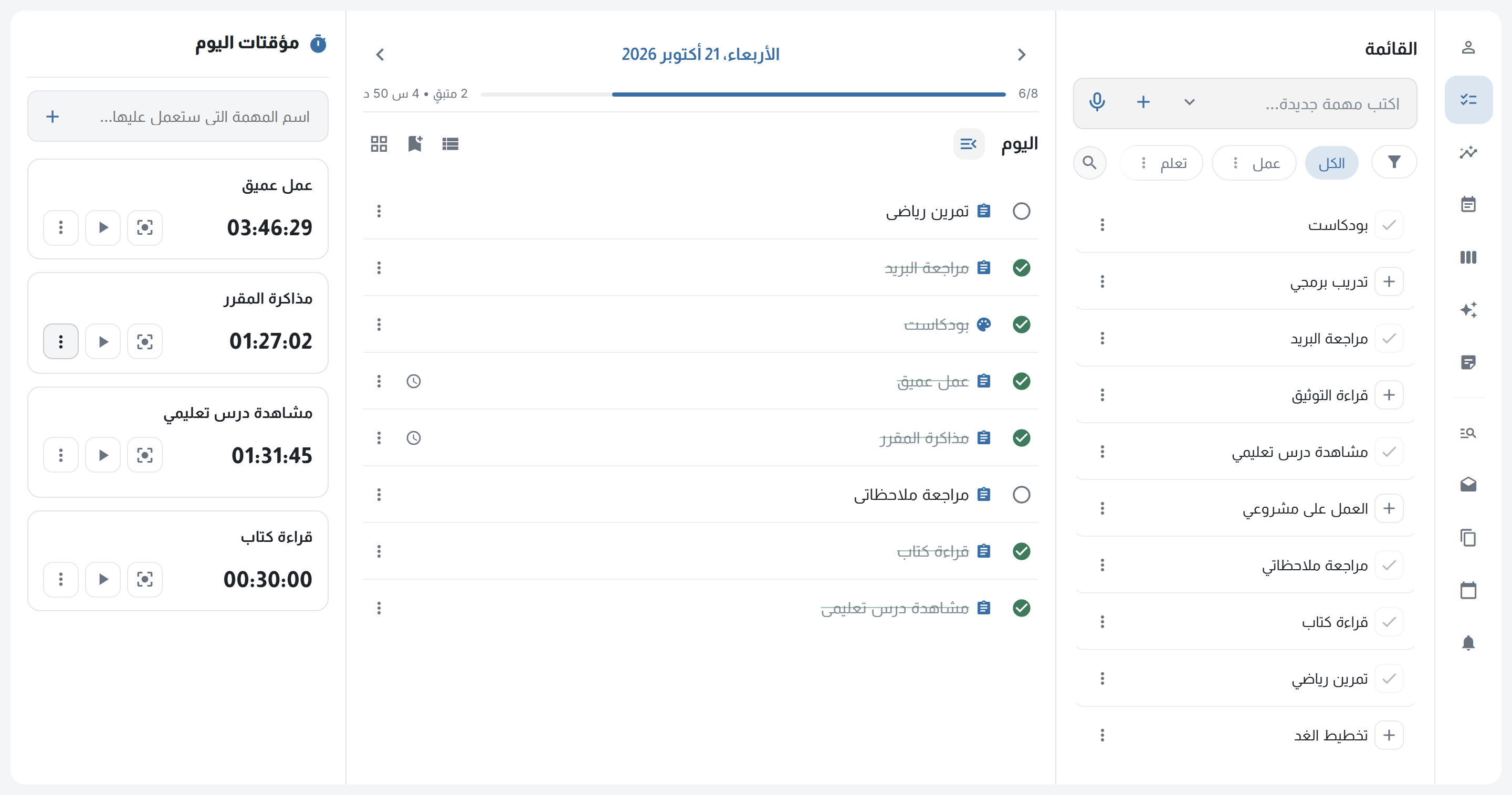
Real screenshot from Nazzam: task bank, tasks, and timers لقطة حقيقية من تطبيق نظم: القائمة والمهام والمؤقتات

One place for your whole day

Tasks, notes, timers, and your timeline, together instead of scattered across apps.

Nazzam TasksTasks, habits, hobbies NotesPinned and searchable AssistantBy text or voice TimelinePlan hour by hour TimersTrack the real time InsightsSee where time goes Nazzam TasksTasks, habits, hobbies TimelinePlan hour by hour NotesPinned and searchable TimersTrack the real time AssistantBy text or voice InsightsSee where time goes

Capture it once. Plan it anywhere.

Type it or say it, then give it a type, a time, and a priority. Reuse what repeats.

Call the design team Call the design team Tomorrow Goal: 1h High Set after it's added

Capture in seconds

Type it or say it and it lands in your list. Set the day, time, and priority after.

TasksHabitsHobbies

Tasks, habits, hobbies

One searchable bank. Each type has its own icon and repeat rule.

Ship API integration PrioritySubtasksTimeNote High 2 of 4 45m of 2h 1 note

Details that matter

Priority, subtasks, and notes on every task. Set a time goal and see the time you actually spent.

Morning walk Template Morning walkMorning walkMorning walk Mon 27 Tue 28 Wed 29

Templates and routines

A task template keeps its full details — priority, type, duration, note, and subtasks. A day routine applies a whole day in one tap.

Plan your day hour by hour

Drag any task to the hour that suits it and set how long it takes. Whatever you haven't placed waits in the side panel. The timeline works in a daily or weekly view, and the monthly calendar moves you between days.

26 Monday 9:00 AM10:00 AM11:00 AM12:00 PM1:00 PM Project work 9:00 – 10:30 · 1h 30m Call with design team 1h Read a book 1h Unscheduled 6 Plan tomorrowReview email +2 more Read a book 26 Monday Unscheduled 6 9:00 AM10:00 AM11:00 AM12:00 PM1:00 PM Project work 9:00 – 10:30 · 1h 30m Call with design team 1h 1h Read a book

Your list becomes a timeline

Drop a task on the hour you want, stretch it to the time it needs, and see your whole day or week at a glance.

Day Week Month

Know where your time goes

Time any task, focus in one tap, and see the actual minutes.

Today’s timers

Focusing ·
00:00:00

Your progress and time, in one panel

See what you planned, what you finished, and where the time went.

Time distribution

26h 36m Total
  • Work11h 10m
  • Study8h 45m
  • Sport6h 41m

Weekly activity

+12% vs last week
26h 36m
Actual
2h
8h
3h 30m
5h
4h
2h 30m
1h 36m
Sun Mon Tue Wed Thu Fri Sat

Completion rate

This week
92% Completion rate
  • Done34
  • Missed3

Plan vs actual

This week
112%
Dev project 4h 30m / 4h
78%
Client review 1h 10m / 1h 30m
100%
Learning 2h / 2h

Commitment map

8 days

Reading habit · last 3 weeks

Done 18 Missed 2 Rest 1

A helper that closes the distance

Say it or type it, in Arabic or English. Keep loose ideas in notes until they're ready to become tasks.

Nazzam Assistant Hi! I can brief your day, add a task,or take you to any feature. brief my day add gym tomorrow add gym tomorrow Added “gym” to Tuesday,27 October. Ask me: brief my day, add a task…

Nazzam Assistant

Brief your day, add tasks, or jump to any feature. By text or voice, in Arabic and English.

Write a note (idea, reminder, link…) Pinned Landing page idea:lead with the timeline,keep every card to one line. Sunday, 18 October Turn into a task Lead the landing page with the timeline

Notes without the clutter

Pin them, search them, and turn any idea into a task in one tap.

More than a to-do list

Lists that sort themselves, reminders that nudge, and your data wherever you need it.

OverdueTodayTomorrow This weekNext weekHigh priority 50+ 6 6 30 22 0 Today All tasks for the selected day. Course revisionDaily journal 2:00 PM 4:30 PM

Smart Lists

Overdue, today, tomorrow, this week. Your tasks group themselves by time and priority.

October 2026 SunMonTueWedThuFriSat 18192021222324 25262728293031 1234567 891011121314

Month at a glance

Jump to any day from a clean month calendar.

marke Marketing plan Marketing report Marketing call Saturday, 17 OctoberFriday, 16 OctoberThursday, 8 October

Find any task

Search every task, past or present. Matches are highlighted as you type.

Light Dark

Make it yours

Light or dark, with a palette of accent colors.

Reminder Weekly report 9:00 AM

Reminders

Get a nudge on the tasks that can't slip.

ImportFrom a file ExportYour tasks CalendarICS file ReportPDF

Import, export, share

Bring tasks in, back them up, or send your plan to any calendar or as a PDF.

Start free, upgrade when you need

Every account starts with a 7-day Pro trial — no card required.

Free

$0Forever

Essentials for light use — with clear limits.

  • Up to 100 tasks, habits & hobbies
  • Calendar, day view, and notes
  • Subtasks, recurring tasks, and global search
  • 3 active reminders and 3 saved timers
  • Up to 100 notes and 5 saved filters
  • Works offline
Start free trial

Monthly

$4/ month

Every feature unlimited, with monthly flexibility.

  • Unlimited tasks, notes, timers, and filters
  • Timeline with drag and drop
  • Smart lists and ready-made templates
  • ICS export and PDF reports
  • Full stats and streaks
  • 5 active reminders
Subscribe

Prices are in US dollars. Your 7-day Pro trial ends automatically at no charge, and the account returns to the Free plan with its limits. You can cancel at any time — see the refund policy.

Questions before you start.

Quick answers about the free trial, privacy, and subscription.

Does Nazzam work offline?

Yes. The app installs on your device and saves locally, then syncs when you are back online.

Where is my data stored?

On your device first, then in your private account. It is never shared, and you can export it anytime.

How does the free trial work?

7 days of all Pro features, no card. Then you move automatically to the free plan.

Can I export my tasks and reports?

Yes — a full JSON backup, an ICS calendar, and PDF reports.

Is my data protected?

Encrypted on your device before storage. On conflict, sync keeps the newest copy and a backup.

Can I cancel anytime?

Yes, from inside the app. Your plan stays active until the last paid day.

Start your day from one place.